Pick, don’t type
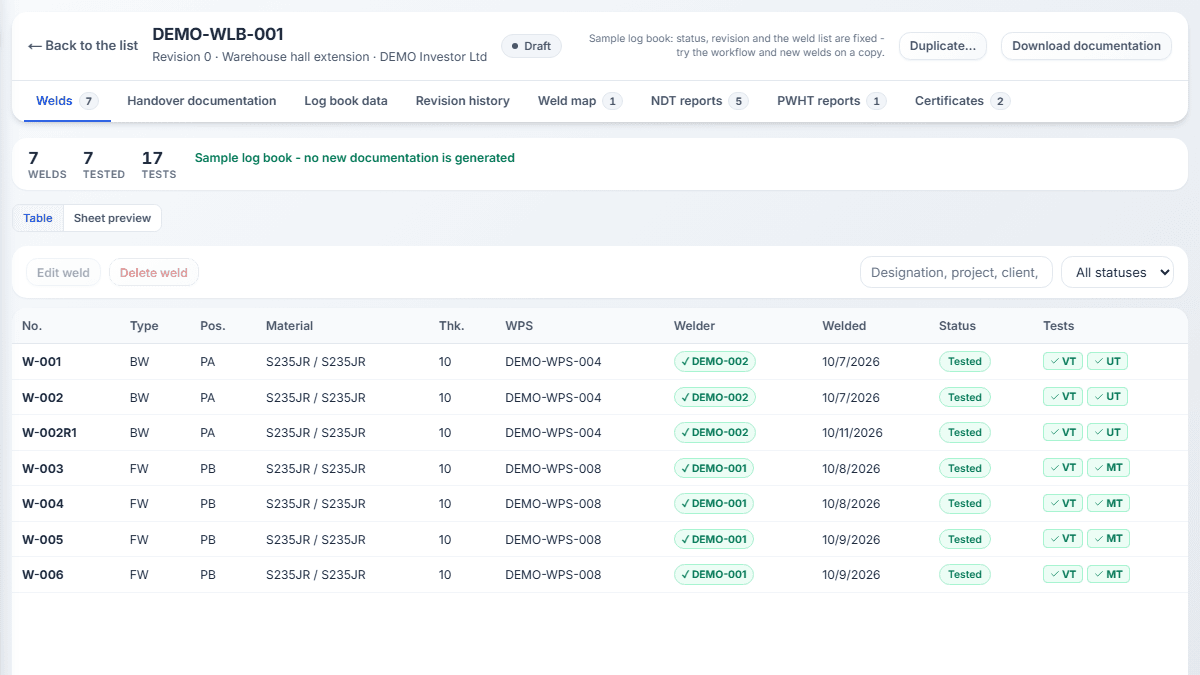
WPS, welder and material come from the registers you already keep in WeldStack. No retyped procedure numbers and no welder stamp that belongs to nobody.
Log each weld with its WPS, welder, materials and test reports as you go. Mark the welds on your own drawing. At handover you download one PDF with a table of contents — not a binder assembled in the final week.
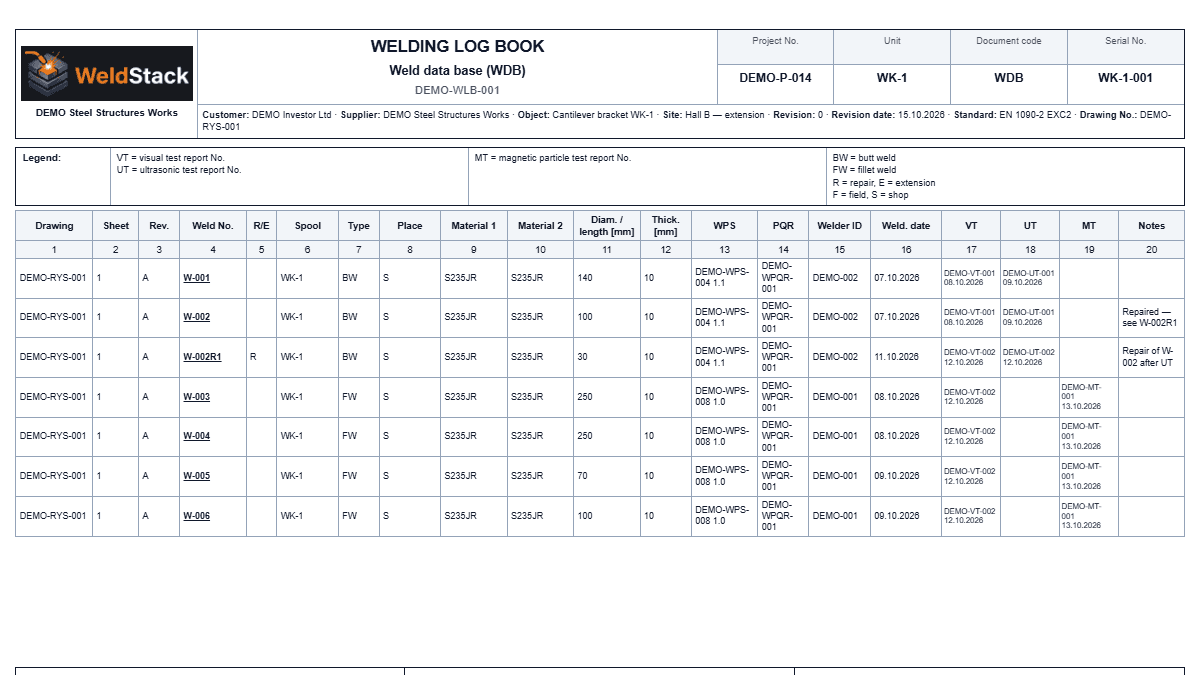
A blank weld log sheet laid out the way our own software prints it: a title block for the project, a legend for the test abbreviations, 24 columns for each weld and a signature strip at the bottom. It prints on a single landscape A4 page. No sign-up, no email address.
Download the weld log template (XLSX)Opens in Microsoft Excel, LibreOffice and Google Sheets. No macros. You get the file in the language this page is set to.
A weld log — also called a welding log, a weld register or a weld database — is a table with one row per weld. Each row answers what the client’s inspector asks at handover: which weld, on which drawing, made to which procedure, by whom, joining which materials and with which test reports. These are the columns of our sheet and of the free template.
| Columns | What they are for |
|---|---|
| Drawing, sheet, revision | Where the weld is, and which revision of the drawing it was made to. |
| Weld number, R/E mark | One number per weld — the same number as on the weld map. The R/E mark shows a repair or an extension of an existing weld. |
| Spool, weld type, place | Which spool the weld belongs to, whether it is a butt or a fillet weld, and whether it was made in the shop or in the field. |
| Material 1, material 2 | The two parent materials being joined, so each side can be traced back to its material certificate. |
| Diameter or length, thickness | The dimensions of the joint. They determine whether the WPS and the welder’s qualification cover the weld. |
| WPS, PQR / WPQR | The procedure the weld was made to and the qualification record behind it. |
| Welder ID | Who made the weld — the stamp or ID that links the row to the welder’s qualification. |
| Welding date | When the weld was made — needed to check that the WPS and the welder’s qualification were valid on that day. |
| VT, RT, UT, PT, MT, PMI, LT | The report number for each test on the weld: visual, radiographic, ultrasonic, penetrant, magnetic particle, positive material identification and leak testing. |
| Notes | Anything the next reader should know: hold points, deviations, client comments. |
The template is a good start. On a job with a few hundred welds, the work is no longer filling in rows — it is keeping them consistent with your procedures, certificates and reports.
WPS, welder and material come from the registers you already keep in WeldStack. No retyped procedure numbers and no welder stamp that belongs to nobody.
When you assign a welder, the log checks the weld against the welder’s range of qualification and warns you right away if it is not covered. It warns — the decision stays with you.
Upload your drawing and mark the welds on it. Each marker carries the weld number from the log, and the map goes into the handover documentation.
Weld table, weld maps, NDT and PWHT reports, material certificates — compiled into one PDF with a table of contents. The weld table also exports to Excel.
Start your first weld log today
7-day trial with every module, no credit card. Load a sample weld log to see a finished one before you start your own.
The three terms are often used interchangeably, but they are three parts of one job.
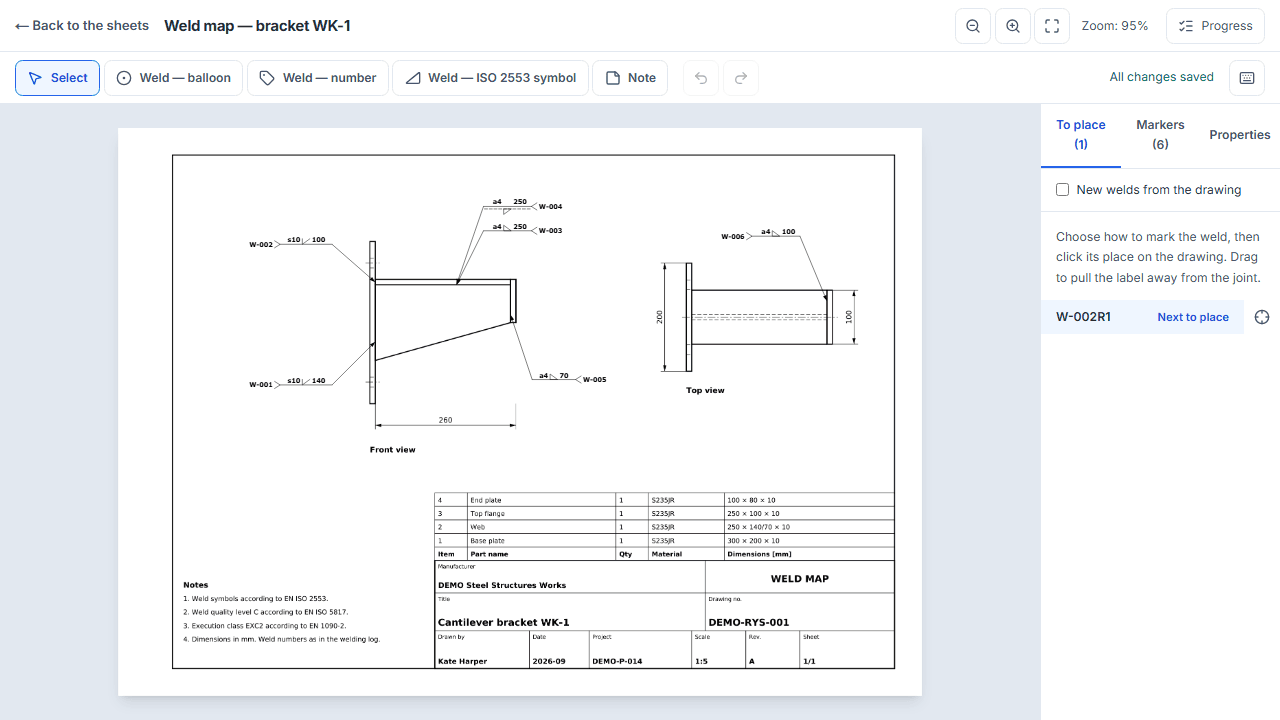
Shows where each weld is: a drawing or an isometric with a number at every joint. Weld mapping software puts those numbers on your drawing instead of on a marked-up printout.
Records what was done to each weld: procedure, welder, materials, date and test reports — one row per weld number.
Keeps the two up to date as the job progresses, so you can see at any time what has been welded and which test reports are in.
Being able to go from any weld to its WPS, its welder and its material certificates — and back again, from a certificate or a welder to every weld they apply to. A weld map and a weld log kept together give you that.
EN ISO 3834 and EN 1090-2 do not prescribe a form called a weld log. They ask for traceability and for records, and so do client specifications; a weld log with a weld map is the usual way to keep both down to the individual weld.
Which records your job needs is set by the contract and the standards it references. This page is an overview, not a substitute for either.
WeldStack keeps the weld log alongside your WPS, WPQR, welder qualifications and equipment — in one system. Free trial, no credit card.